
Slop or Solution? The Honest Guide to Building a Website With AI
You can now describe a website in one sentence and watch a machine build it in front of you. It feels like magic. Sometimes it is.
And sometimes it's slop.
Both come out of the same machine. The trick is knowing which one you're looking at, because from ten feet away they look identical. One earns you customers for years. The other is a cardboard storefront with the lights off. Let's sort out which is which, and how to build the kind that actually works.
The honest pros and cons
I'm not here to tell you AI website builders are bad. I use these tools. They're genuinely good at some things and genuinely terrible at others. Here's the straight version.
The pros:
- Speed. What used to take a week of layout work now takes an afternoon.
- Cheap to start. You can get a real draft for the price of a coffee subscription.
- No blank page. It gets you to something you can react to, which is worth a lot.
- Great for testing an idea before you spend real money.
The cons:
- It builds the average of everything it has ever seen. Average is another word for forgettable.
- It has no idea what makes your business different, because it has never met you.
- It fakes the hard parts. The stuff that makes a site actually rank and convert gets skipped or faked.
- It stops at "looks done," which is a very different place from "is done."
So it's a fast, cheap builder with no judgment. That's the whole thing in one line. Use it for the speed. Never trust it with the decisions.
What is slop?
Slop is what you get when you let the machine make the decisions.
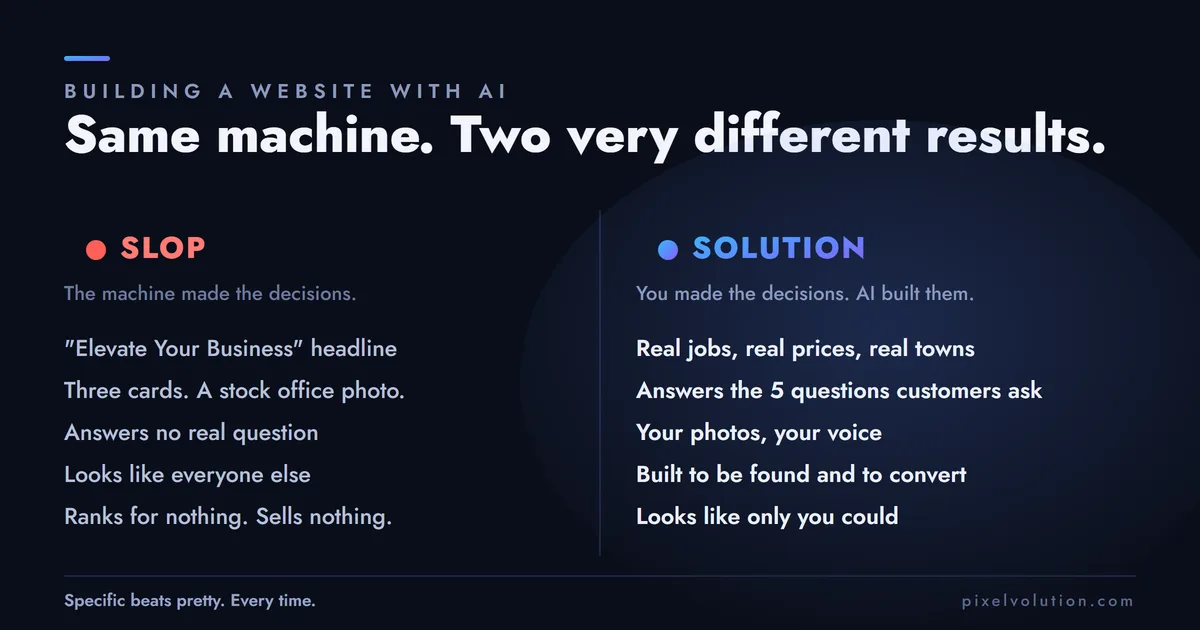
You've seen it. Every AI site looks the same. A big gradient hero. A headline that says "Elevate Your Business" or "Solutions That Drive Results." Three cards in a row with little icons. A stock photo of people in a bright office pointing at a laptop. A contact form nobody built to actually work.
It reads like it was written by someone who has never done your job, for a customer they've never met, to answer a question nobody asked. Because that's exactly what happened.
Slop looks like a website the way a mannequin looks like a person. All the parts are in the right place. There's just nobody home.
Why slop is bad
Because it does not do the one job a website has: turn a stranger into a customer.
Google can smell it. Search engines have spent years learning to spot pages that say a lot and mean nothing. A site that reads like every other AI site, answering none of the real questions people search, is a page Google has no reason to rank. You end up on page five, which is the same as not existing.
Your customers can smell it too. People decide in a couple of seconds whether a business is real and worth their money. A generic site tells them "this could be anyone." When you're a real plumber competing with a real problem at 9pm, "this could be anyone" loses to the guy whose site clearly knows what a failed water heater looks like.
It answers nothing. Your customers have specific questions. How much. How fast. Do you cover my town. Have you done a job like mine. Slop answers none of these, because the machine didn't know to ask them. So the visitor leaves and calls someone who does.
A pretty site that sells nothing is not a cheap website. It's an expensive brochure that happens to be online.
How to avoid slop
Here's the good news: slop is easy to avoid, and it's free. You just have to give the machine the one thing it can't invent.
The raw material. The stuff only you have.
- Your real jobs. Not "we offer quality service." The actual jobs. "We replaced a 40-year-old panel in a 1960s Albany ranch house without tearing up the drywall."
- Your real prices, or at least real starting points. "Service calls start at $89" beats "competitive pricing" every time.
- Your service area, by name. The exact towns. Google and customers both want the specifics.
- Your actual photos. Your truck, your crew, your finished work. Not the office-stock people.
- The real questions. The five things every customer asks you on the phone. Those are your best pages.
Specific beats pretty. Every time. The machine will happily make you something pretty out of nothing. Your job is to refuse to let it work from nothing. Feed it the specifics, and the same tool that makes slop for everyone else makes something only you could have made.
How to actually build a real website with AI
Here's the mindset that changes everything: AI is a brilliant builder and a terrible decider.
Give it a decision to make and it picks the average. Give it a decision already made and it builds it fast and well. So your job is to make every real decision first, then hand the machine the labor.
The decisions are yours: Who is this for. What does it need to make them do. What makes you different from the next guy. What are the pages that answer real searches. What do you want someone to do in the first ten seconds.
Once those are locked, the machine is genuinely useful. It writes the first draft, builds the layout, wires the pieces. You bring the brain. It brings the hands.
The top 10 prompts to build a real website
These are in order. Each one builds on the last. Don't skip to the fun part. Run them wherever you're building (more on where in a second).
1. Set the brief. "You are helping me plan a website for [your business] in [your town]. We serve [who]. The one thing that makes us different is [X]. The single most important action a visitor should take is [call / book / quote]. Ask me five questions that will make this site specific to us, not generic."
2. Map the pages. "Based on that, list the pages this site needs and the one job each page does. Prioritize pages that match what my customers actually search for, not pages that just look standard."
3. Write the homepage from real facts. "Write the homepage using only these real facts: [paste your jobs, prices, service area, differentiator]. No filler adjectives. No 'elevate' or 'solutions that drive results.' Write like a person who does this work talking to a customer who needs it."
4. Build a service page that targets a real search. "Write a page targeting someone searching '[real search term, like water heater repair Albany].' Answer their actual worry in the first two sentences. Include what it costs, how fast we can come, and proof we've done it before."
5. Lock a design system, not a vibe. "Give me a simple design system: one heading font, one body font, a primary color, a neutral background, and consistent spacing. I want it to look like one intentional brand, not a template. Show it as reusable tokens."
6. Now build it. "Build the homepage as a responsive page using that design system and that copy. Mobile first. Fast-loading. No giant hero images that push the real content down."
7. Handle local SEO. "Add the SEO basics: a specific page title and meta description for each page, local business structured data with our name, address, phone, and service area, and clean headings. Show me what you added."
8. Turn phone questions into an FAQ. "Here are the five questions customers actually ask me: [paste]. Write a real FAQ that answers each one plainly and honestly. These are search gold, so treat them like real pages, not filler."
9. Do a speed and accessibility pass. "Review this for performance and accessibility. Check image sizes, color contrast, alt text, and whether it works with a keyboard and a screen reader. List what's wrong and fix it."
10. Write the share cards. "Write the title, meta description, and social preview text for each page so it looks right when someone shares the link in a text or on Facebook."
Do those ten, with your real facts, and you will be miles ahead of anyone who typed "build me a plumbing website" and hit go.
Where to run them. For generating a whole site fast, tools like Lovable, Bolt, and v0 are the current crop. For the thinking, the copy, and the structure, a good chat model like Claude or ChatGPT does the heavy lifting. For anyone who wants real control over the code, Cursor and similar editors let a developer drive with AI riding shotgun. Pick your lane. The no-code generators get you about 80% of the way and then you hit a wall, which is a perfect segue to the part nobody warns you about.
Prompting a website is a big rush
I need to be honest about something, because it's the trap that gets everybody.
Building a site by prompt is a genuine rush. In twenty minutes you go from a blank screen to a thing that looks like a real website. Buttons that click. A menu that opens. Your name in big letters at the top. It feels amazing. It feels done.
That feeling is the most dangerous part of the whole process.
Because "looks done" and "is done" are separated by a canyon, and the rush makes you want to plant a flag on the wrong side of it. You want to publish. You want to text your friends the link. You want to check the box and move on.
Enjoy the rush. It's real and it's earned. Just don't confuse the high of a good demo with a finished website. The demo is the first 20% of the work wearing a costume of the last 20%.
The list of everything that still needs to be done
Here's what's under the water line, the stuff the machine skipped, faked, or never mentioned:
- Real content on every page. Not placeholder, not "lorem ipsum" with your logo on it. Every page, filled with true, specific words.
- A domain, DNS, and email that actually work. The plumbing behind the plumbing.
- Hosting that won't fall over the day you get busy.
- Testing on real phones. Not the preview window. Actual devices, actual thumbs.
- Speed. A site that loads slow bleeds customers and rankings before anyone reads a word.
- The full SEO layer. Titles, meta descriptions, a sitemap, a robots file, structured data, canonical tags. AI fakes a little of this and forgets the rest.
- Analytics and cookie consent that follow the privacy laws, or you invite the kind of letter no small business wants.
- Forms that truly deliver. A contact form that looks fine but silently drops messages is worse than no form at all.
- Accessibility, so customers using a keyboard or a screen reader can actually use you.
- Redirects, if you're replacing an old site. Skip these and every page Google already knew about turns into a dead end. (Ask me how I know.)
- The legal pages. Privacy policy, cookie policy, terms if you need them.
- Backups, security, and updates, because a site is a thing that has to be kept alive, not a statue.
- Your Google Business Profile and local listings, which for a local business often matter more than the website itself.
None of that is glamorous. All of it is the difference between a website and a decoration. This is the 80% that starts exactly when the rush ends.
When to hire, and when not to
Let me be square with you, because I'd rather lose the work than sell you something you don't need.
Hire a developer when you just need it done, and done right, and your time is worth more spent running your business than fighting a page builder at midnight. Your website is your storefront. If it being slop would cost you real customers, that's not the place to save a few hundred bucks. You hire out your books and your legal for the same reason. Some things are worth having done by someone who does them every day.
Don't hire when you're only trying to save a dollar, or only trying to check a box. If the cheapest possible number is the only thing that matters to you, you'll squeeze whoever you hire, you won't value what you get, and you'll both walk away unhappy. And if a website is just a box you're ticking because someone told you that you should have one, you don't need to pay a professional to help you not care. Build the AI draft, ship it, move on. That's a fine choice, as long as it's an honest one.
The worst outcome is the middle: paying real money for a site you treat like a throwaway. Either it matters, and you invest in it. Or it doesn't, and you keep it cheap. Just don't pretend a checkbox is a storefront, or the other way around.
You're not done. You just started.
Here's the part that reframes everything.
A website is not a product you finish. It's a garden you tend. The build, the fun part, the rush, is planting day. It's real work and it matters. It's also about a fifth of the job.
The other four fifths is everything after. Keeping the content true as your business changes. Adding the pages for the searches you're missing. Watching what works and doubling down. Fixing what breaks. Feeding it, so it grows instead of quietly rotting. (I wrote a whole piece on how fast a neglected site goes bad, called aging like milk, if you want to see what the rot actually costs.)
AI changed how fast you can plant. It changed nothing about the tending. If anything, it made the tending matter more, because now everybody can plant, and the only thing that separates a real site from the slop is what you do after launch day.
So use the tools. Get the rush. Build the draft in an afternoon and enjoy every minute of it.
Then roll up your sleeves, because that's when the real work, the work that actually earns you customers, gets started.
I build websites that do the whole job, not just the pretty part. If you've got an AI draft you're not sure about, run it through my free site analyzer or just send it over and I'll tell you straight what's slop and what's worth keeping. Want it done right the first time? Here's how I build them.